

A new shape for the document · Cloud v1 live

The document is overdue
for a rewrite.

Prose, a real drawing canvas, and your source files — PDFs, datasets, diagrams — as equal parts of one page, not three apps bolted together. A DocuShark document acts like a mini-Google-drive in one file: it opens in under a second, and any AI agent you point at it makes real edits alongside you. The page engineers and researchers always wished they had.

Opens in under a second · resident in memory, never a spinnerOpen-source core · your work is never locked inMCP-native · your agent makes real edits, you approve them
Brings in everything you’ve already drawn

Three dimensions of one document.

The tools we all use are genuinely good at one thing each — Notion at prose, Miro and Excalidraw at the canvas, your drive at the files. The cost is the tab-hopping between them. DocuShark brings all three onto one page as first-class peers — three dimensions of the same document. A DocuShark document acts like a mini-Google-drive in one file. Once you’ve worked this way, juggling three apps feels like a step down.

Prose that scrolls

Rich text that’s a joy to write in

Headings, code blocks, callouts, tables. Write in Markdown or don’t — the editor feels exactly like the one you already use, and never makes you think about it.

# detect duplicate webhooks SELECT id, count(*) FROM stripe_events GROUP BY idempotency_key HAVINGcount(*) > 1;
Diagrams that scale

A pro’s canvas, not a widget

Flowcharts, network topologies, UML, database schemas — nearly 200 first-class shapes, the depth of Visio with none of the weight. Draw thousands of them and it never stutters. This is an editor for people who diagram for a living.

clientgatewayapidb
Data that lives inline

Your sources, embedded — not linked away

Papers, datasets, figures, instrument output — embedded as first-class blocks that render in the page, not flat thumbnails that bounce you to another tab. They load straight from storage, so even a 40-page PDF opens at once.

PDFpayments-design.pdf11 pages · embedded inline
CSVlatency-p95.csv4,210 rows · live table
PNGthroughput-2026.pngfigure · pinned to canvas

It opens before you’ve let go of the click.

Active documents live in memory and stream to you over a live connection — no full-page reload, no “Loading content…”, no spinner. Documents that aren’t open yet pull from storage in tens of milliseconds and stay warm for the session. Embedded files come straight from object storage to your browser, so even heavy PDFs and datasets appear at once.

Resident in memory

Open documents live in the relay’s RAM as CRDTs. Opening one is a handshake and a state push — not a database query.

Cold reads, still instant

Documents that aren’t resident load from object storage in tens of milliseconds, then stay warm for the rest of your session.

Blobs go direct

Embedded files stream straight from storage to your browser — the bytes never route through our servers. Faster, and free to move.

Built first for people whose output is the document.

DocuShark isn’t three products. It’s one engine — canvas, prose, data, imports, AI — that rearranges itself into a layout for the work in front of you. We built it first for engineers and the researchers right beside them, then opened the same page to everyone — because a runbook you ship on Tuesday and a thought you catch on Sunday deserve the same tools.

Wedge · 01 · primary

Engineering teams

Where the document is the deliverable — RFCs, architecture, runbooks, schemas. Diagrams as code, an AI that edits the canvas, and an import on-ramp that brings every diagram you already have.

⌘Kvim
  • Import Mermaid, drawio & Excalidraw — bring the diagrams you already have
  • Command palette, vim keybinds, named version snapshots
  • MCP write-mode, custom shape libraries, schema validation, audit log
Cloud, desktop, or your own serversOpen source
Wedge · 02

Researchers

Source files — PDFs of papers, CSVs of data, recorded sessions, raw figures — live right next to your docs and canvas. Embed a 40-page PDF, drag a highlight onto the canvas, keep editing. Your supporting material doesn’t have to live somewhere else anymore.

  • Embedded PDFs & spreadsheets render in-canvas, not as flat thumbnails
  • Citations as first-class objects — BibTeX, CSL JSON, DOI lookup
  • Documents pinned to Toronto today · EU + US-East on demand
Docs + files + canvas = one workspaceZotero importer on deck
Wedge · 03 · broad

Everyday writing

The same page, quieted down — for notes, flowcharts, and the diagrams you sketch once and reach for later. No technical knowledge required: it just opens, just works, just stays out of the way, on your phone or your desktop.

  • Distraction-free single column, full-width canvas on toggle
  • Auto-save, version timeline, undo across days
  • Free to use for everyday writing — no credit card required
Best on Cloud★ free forever

What the new page looks like when people get it.

No marketing renders. No staged screenshots. Real documents built by real users in the production app — the kind of work that wasn’t possible on a page until the page was rebuilt.

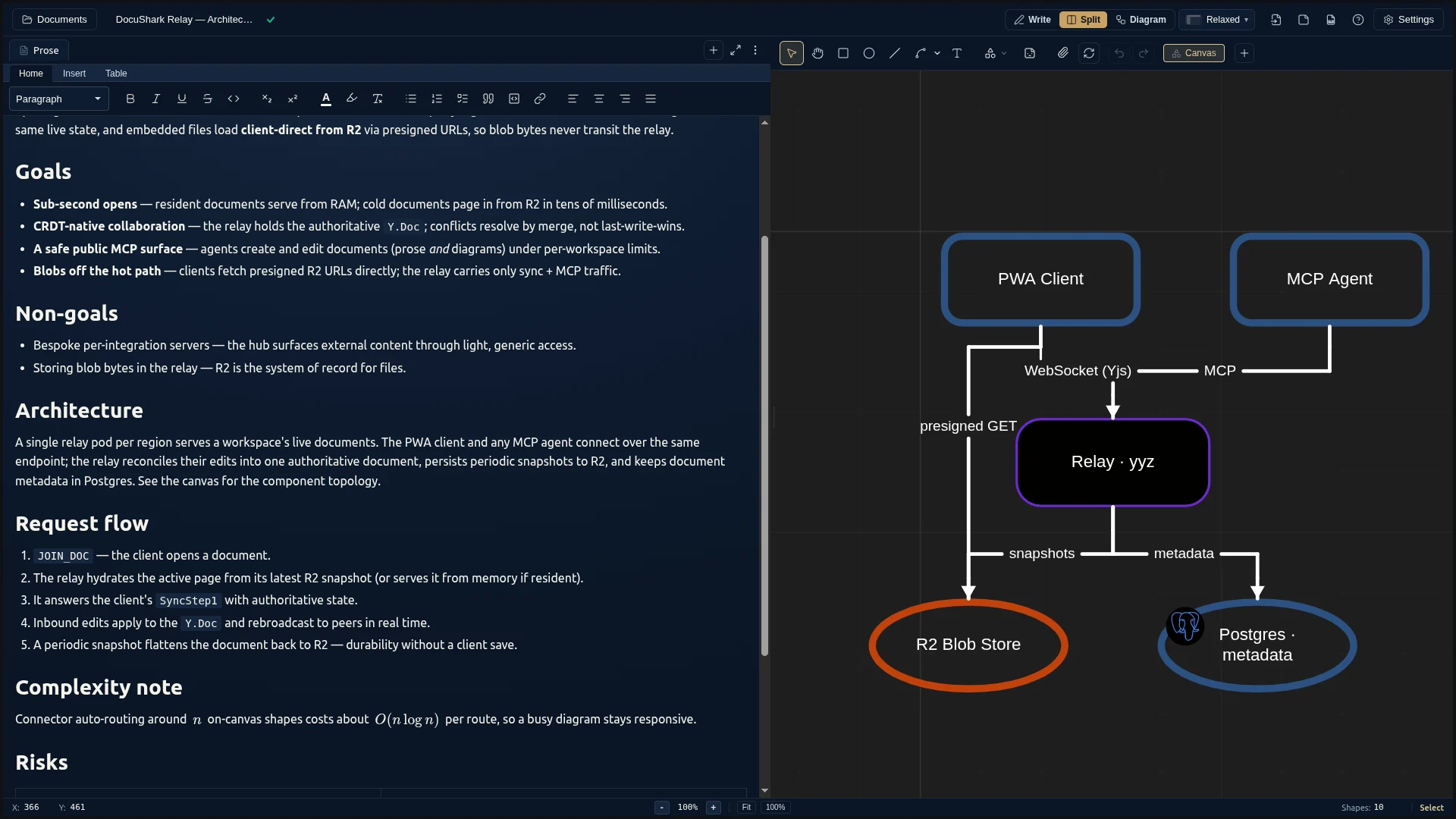
An architecture RFC in DocuShark — prose alongside a routed system diagram of the relay, with live document fields.
Architecture

Systems, end to end.

Network topologies, service maps, database schemas — on a canvas that handles thousands of shapes without breaking a sweat.

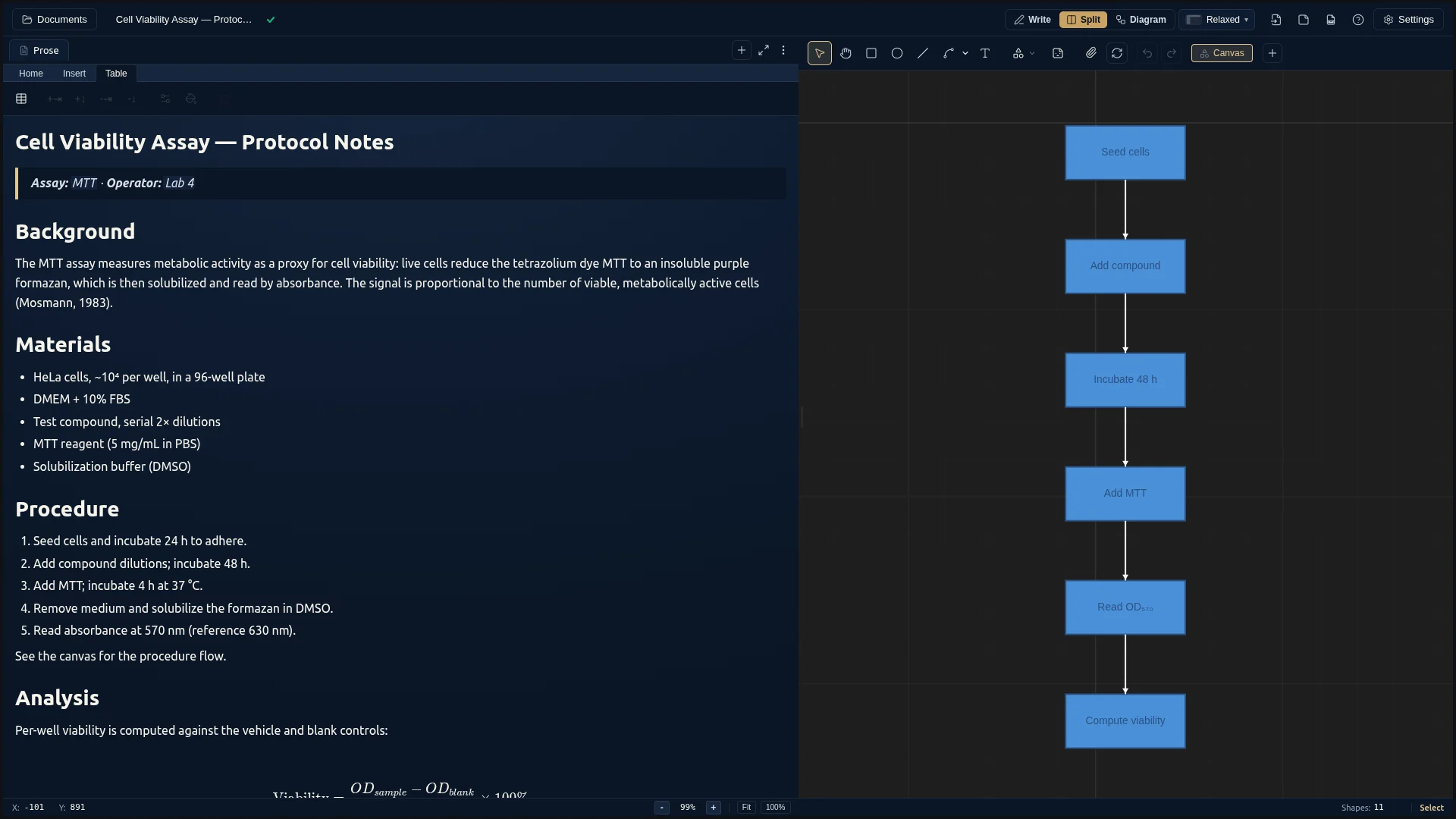
A lab protocol in DocuShark — a top-to-bottom procedure flow, a results table, citations, and a live KaTeX formula.
Process

Flows that read top-to-bottom.

Onboarding flows, incident playbooks, decision trees — auto-routed connectors keep the lines honest.

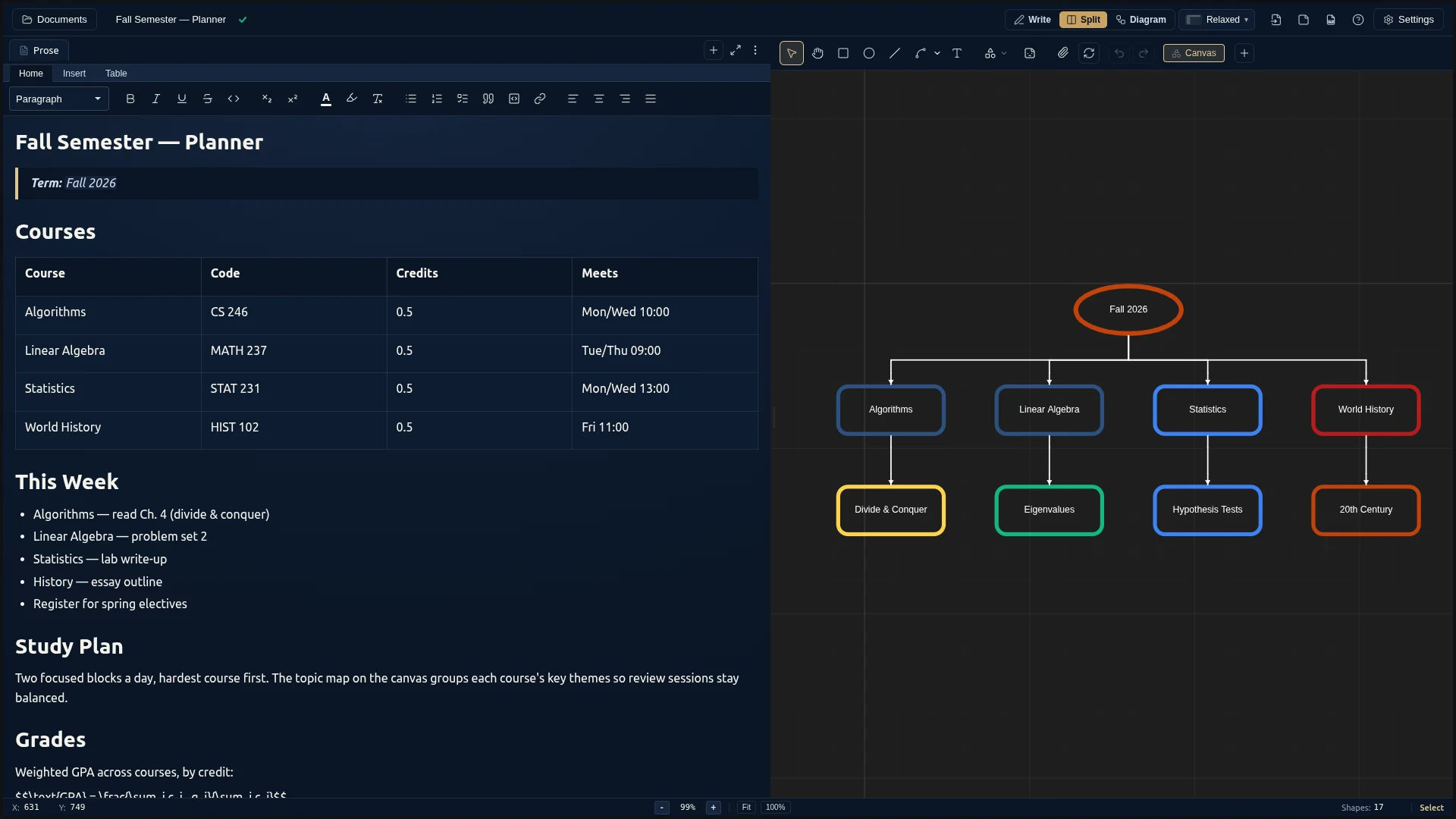
A semester planner in DocuShark — tables and a checklist beside a topic mind-map on the canvas.
Document + canvas

A page that lives in both worlds.

Rich text on the left, shapes on the right, and your AI can edit both — exactly how DocuShark is used in practice.

We took the hard parts. You get the page.

Real-time collaboration is genuinely hard to run well — which is why it’s so often the paywalled tier. We host it for you at docushark.app and kept the whole thing open source anyway, so you get the convenience without ever being trapped.

DocuShark Cloud · recommended

Managed by us

A workspace your whole team opens in the browser — no setup, no servers to babysit. We run it, keep it fast, and ship every upgrade the moment it’s ready. You could self-host the whole thing — but at a few dollars a month, sign in with one click, and fast from your nearest region, most people happily don’t.

  • Sign in with GitHub or Google — nothing to install
  • Live collaboration — cursors, presence, and comments in real time
  • Connect any AI assistant straight to your workspace
  • Share a read-only link with anyone, instantly
  • Full version history — every save kept, named snapshots
  • Your data stays in your region — Toronto today, more on the way

DocuShark Desktop & self-host

Free & open source

The desktop app saves documents straight to your own computer — fully offline, nothing touches the internet. Need everything to stay inside your company network? Run it yourself, free, for internal use.

  • Works completely offline — your files never leave your machine
  • Connect a local AI assistant, all on-device
  • Host it for your own team, on your own servers
  • Same format as Cloud — move docs back and forth freely

It’s a website. Until you want it to be an app.

DocuShark lives at app.docushark.app— open the link and you’re already working. Want it in your dock or on your home screen? Install it in a click. Either way it opens instantly and keeps going when your connection doesn’t.

Install it in one click

Add DocuShark to your dock or home screen straight from the browser — no app store, no installer, no download to babysit. It's free, and it's the same app either way.

Opens the instant you tap

No splash, no spinner, no loading bar — the page is on screen before you've finished the click. It stays that quick on your phone as it does on your laptop.

Keeps working with no signal

Your cloud documents — and the files tucked inside them — are kept on your device, so you can open and edit on a plane or a dead-zone subway. Changes sync the moment you're back.

Every workspace, one tap away

Sign in once and jump between your workspaces whenever you like, right from the installed app. No re-auth, no juggling tabs.

Built in Toronto. Other regions when you ask.

DocuShark Cloud runs in Torontotoday. Every workspace is tied to one region from day one — your documents and files never leave it. Chicago, Frankfurt, and Tokyo are next, switching on as demand in each region grows.

Your documents · TorontoAccount & billing · United StatesPIPEDA · GDPR ready
Vote for your regionWe turn on the next pod when its waitlist hits the threshold.
Live now
Torontoyyz
On the request board
Chicagoord
Frankfurtfra
Tokyonrt

Your old .mmd files come with you.

We want your work to walk in the front door. Drop a Mermaid block, a drawio file, an Excalidraw export — DocuShark parses it into native shapes you can keep editing. The work you’ve already done is yours; nothing gets left behind, and nothing gets locked in.

Mermaid
.mmd · Live preview during paste
drawio
.drawio · Layers preserved
Excalidraw
.excalidraw · Sketch styles kept

The document was never going to stay just human.

Point any AI agent — Claude, ChatGPT, Cursor, whatever you use — straight at a document and it makes real edits: rewrites a section in place, swaps a single block by matching its text, wires up new shapes on the canvas. Not a chat window bolted to the side — a publish-target surface safe enough to expose on the open internet, with every change a suggestion you approve or reject.

  • In-place editing · live whole-page writes that broadcast to everyone open.
  • Match-text replacement · swap one confirmed block; a stale edit is refused, never clobbered.
  • Full shape CRUD· create, wire, update, reorder — the canvas is as scriptable as the prose.
  • Suggestions, not surprises · every agent change is yours to approve.

You shouldn’t have to pick a model. So we didn’t.

Most tools are settling on one built-in assistant. That’s a fine bet — it just shouldn’t be ours to make for you. Connect whichever AI you already love — Claude, Cursor, ChatGPT, whatever comes next — and switch any time. The model is yours. The page is yours. No lock-in, on purpose.

Claude
Anthropic
Cursor
coding agent
Codex
OpenAI
ChatGPT
GPTs / custom
Atlassian Rovo
Confluence-aware
Zed
editor
Notion AI
custom agents
Anything else
bring your own
Works properly

Every assistant works equally well — not just one favored partner. They can generate whole diagrams, update schemas, and place shapes intelligently, instead of treating your doc as a wall of text.

See what AI can do

Sources are objects. Not parentheticals.

Every academic and every analyst has the same complaint: their tools treat citations as punctuation. DocuShark treats every cited source as a first-class entity — with metadata, deduplication, and a stable handle the rest of the page refers to. Import a Zotero library, paste a DOI, switch CSL styles, let an agent resolve references programmatically. The full ingest → cite → publish loop, on one page, for the first time.

BibTeXCSL JSONDOI lookupZotero importAPA · MLA · Chicago · Vancouver

We don’t replace your tools. We bring them together.

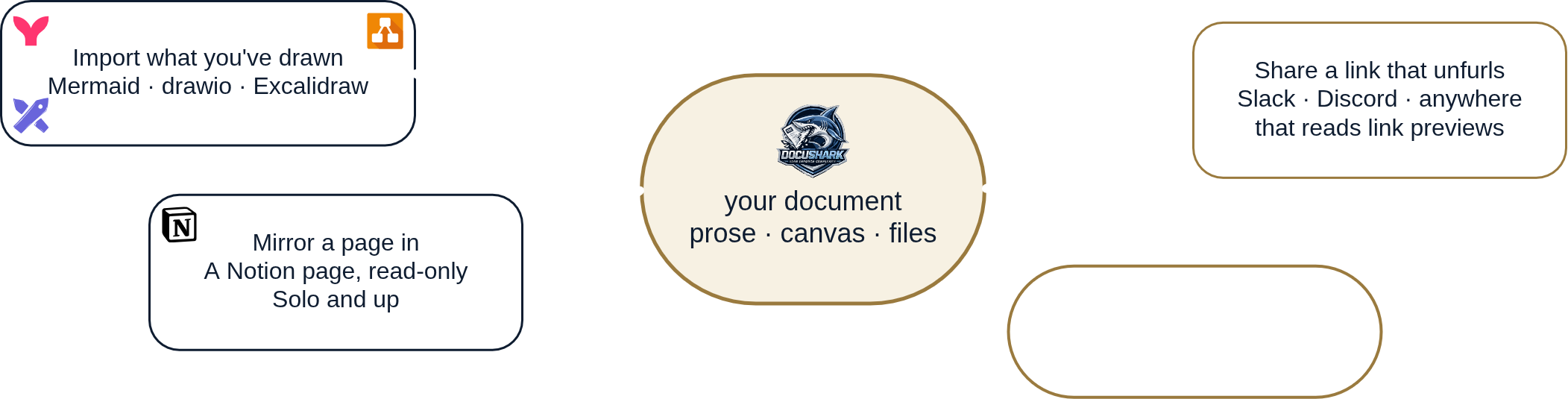
The tools you already use are good at what they do — this isn’t about beating them. It’s about ending the tab-hopping between them. DocuShark is the hub: import the diagrams you’ve drawn today — with page mirroring and live embeds on the way — so you reach it all from inside one document. Light, modular access; your tools surfaced on your page, never rebuilt.

Import what you've drawn

Mermaid, drawio and Excalidraw come in as native, editable shapes.

Live today
Mirror a page in

A Notion or Confluence page, mirrored onto your canvas — read-through and current.

Planned
Embed a live surface

A dashboard, a notebook, any URL — dropped into the document via an iframe.

Planned
Share a link that unfurls

A DocuShark link pasted into Slack, GitHub or Confluence, previewing itself inline.

Planned
We roll these out deliberately, depth-first — a few solid ways to bring your work together, not a hundred shallow connectors. More land on a steady drip.

One simple price. Everything else, unlimited.

No per-seat feature gates, no metered clicks, no counting your documents. You pick a plan and everything that makes DocuShark DocuShark is simply yours — the only thing we ever meter is raw file storage, and it’s capped.

Free · Personal
$0 / mo

The whole editor, free forever — every shape and prose feature. A free Cloud workspace for a taste of sync and sharing. No credit card, ever.

  • 25 MB storage (hard cap)
  • 2 concurrent editors · unlimited viewers
  • MCP read + 50 writes/day
  • 1 workspace
★ Desktop — unlimited, offline, free for good
Start free
Team · Workspace
$15 / seat · mo

Your whole team on one unlimited workspace — everything in Solo, plus pooled storage and editors, roles, and an audit log. It grows with the team.

  • 50 GB/seat pooled, then $0.08/GB-mo (capped $30/mo per workspace)
  • 3 editors/seat pooled · unlimited viewers
  • Roles · audit log
$150/seat·yr · 2-seat minimum ($30 floor) · invoice billing on request
Start a Team
Enterprise— dedicated infrastructure, SSO, data residency, and an SLA when a paying design partner asks for it. Contact us.
Unlimited on every paid planThe good stuff isn’t the upsell. It’s the baseline.
Documents
Shapes & pages
Version history
Viewers & share links
AI edits
Imports & exports

The only thing we ever meter is raw file storage — and it’s capped, so your worst case is known up front. Go past it and your files keep working; the meter just stops.

DocuShark prices and included quotas may improve over time. They will not get worse for existing subscribers without 12 months notice and grandfathered legacy pricing.

DocuShark Enterprise · deferred on purpose

We’re not chasing the logo wall. Yet.

Most companies our size are already burning a year on SOC 2 theatre and “contact sales” mazes. We’re not. The page comes first; Enterprise comes once a paying design partner asks for it — with a published price, dedicated infrastructure, data residency, single sign-on, and an SLA. Drop your email, we’ll write the day it’s real. No sales calls in between.

Get notifiedOne email when it ships. No sales calls.

The page deserved better.

We’ve been writing into the same rectangle for thirty years and calling it progress. DocuShark is the bet that the document is worth rebuilding from the cursor up — in the open, on one engine, for everyone who’s ever wished the page would keep up with the thought.